


_____ AI visibility reporting
How to check AI visibility in Google Search Console
AI visibility is becoming a bigger part of organic search reporting. As an award-winning GEO agency, we look at how brands appear across both traditional search results and AI search experiences, from Google’s AI Overviews to platforms like ChatGPT, Claude and Perplexity.
In June 2026, Google announced new Search Generative AI Performance Reports in Google Search Console (GSC). Eligible site owners can now see dedicated views of how often their URLs appear in Google’s generative AI features, including AI Overviews, AI Mode and generative AI features in Discover.
While this data is undoubtedly useful, it isn’t a full AI visibility report. It only covers Google’s own generative AI features, and not how your brand appears across ChatGPT, Perplexity, Claude, Gemini, or other AI platforms.
That said, it can still give you a useful starting point. GSC can help you to see which pages are appearing, how impressions change over time, and which query patterns can point to more conversational search behaviour.
In this guide, we’ll explain how to check AI visibility in GSC, how to use regex to spot prompt-style queries, and how to turn the data into practical SEO and GEO actions.
What AI visibility means in Google Search Console
In GSC, AI visibility means visibility within Google’s own generative AI features.
As of June 2026, Google’s Search Generative AI performance reports include data for generative AI features in Search, such as AI Overviews and AI Mode. On top of that, Google has also launched a separate report for generative AI features in Discover.
However, a key thing to note is that the report shows impressions, not a brand’s full AI search performance.
In short, impressions show how often URLs from your website appear in generative AI features, which site owners can break down by page, country, device and date.
This can help answer questions like:
- Which pages are appearing in Google’s AI features?
- Are impressions increasing or decreasing over time?
- Which countries are driving visibility?
- Is visibility stronger on mobile or desktop?
- Are priority pages being surfaced, or is visibility limited to blog content?
This is different to tracking your full AI visibility.
A page appearing in Google’s generative AI features does not mean your brand is being recommended across every AI platform, like ChatGPT, Claude and Perplexity. It also does not show exactly how your brand was described, whether competitors were included or which sources were used to create the AI answer.
Search Console gives you one part of the picture. You still need wider GEO reporting to understand how your brand is being retrieved, cited and recommended across different AI systems. This is why AI visibility tracking tools are useful, but they should be treated as the starting point for a wider GEO strategy.
Why is this data still important?
It gives brands a clearer way to track whether their content is being surfaced in AI search experiences.
How to find AI search visibility in Google Search Console
The first step is to check whether your GSC account has access to the new generative AI performance report.
Google is rolling the report out to a subset of website owners first, so not every site will have access immediately. If you cannot see the report, it may be because your account is not included in the rollout yet - or because your site has not received enough impressions in Google’s generative AI features.
If the report is available, you can use it to review impression data across Google’s AI search features.
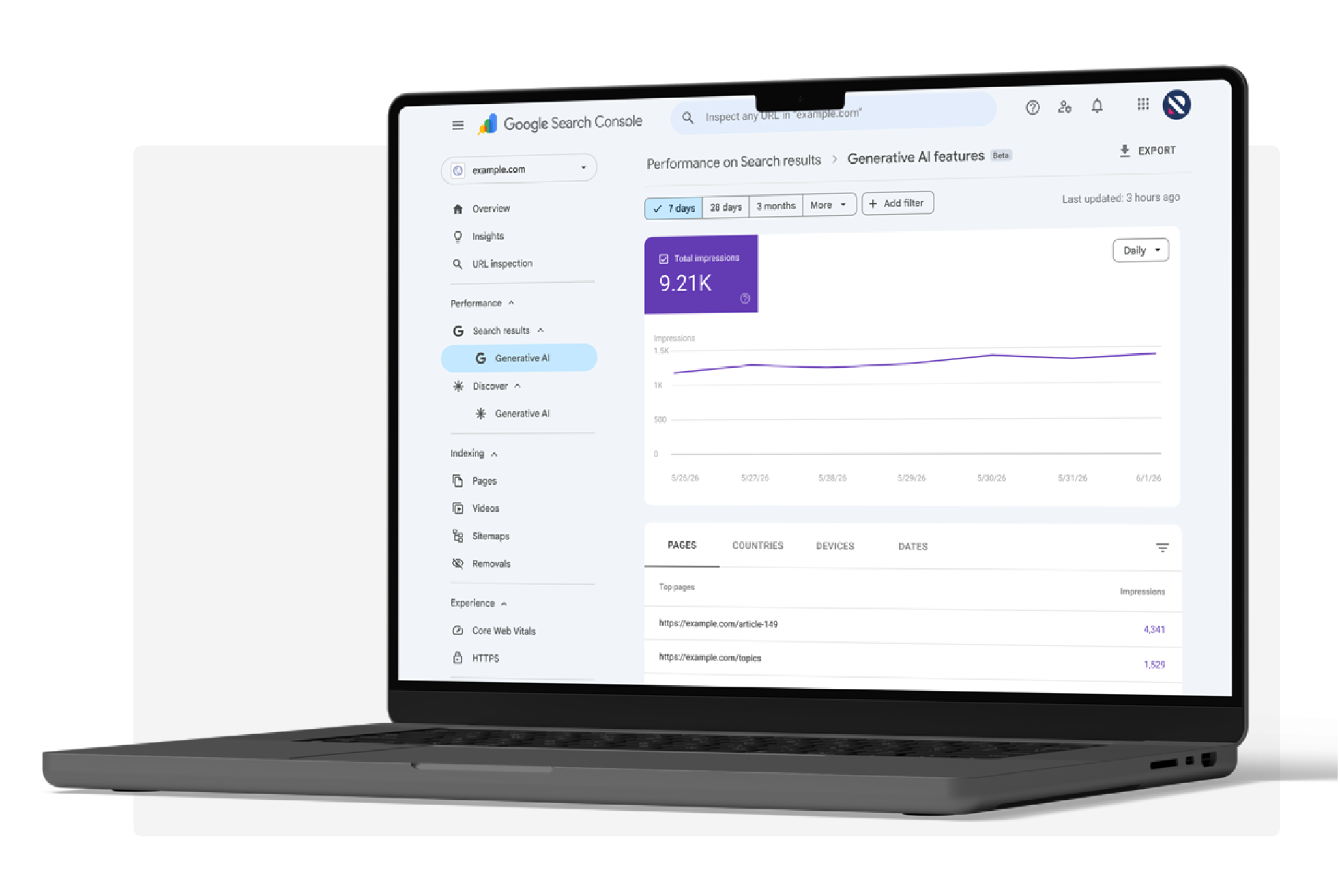
How to check if you have access to the generative AI performance report
To check whether you have access:
Open Google Search Console
Select the relevant property
Go to performance reports
Look for the generative AI performance report
Open the report and review impressions, pages, countries, devices and dates
The report works in a similar way to other performance reports. You can use the chart to review impressions over time and group the data by page, country or device.
Review generative AI impressions over time
Starting first with ‘date’ view - this helps you to determine whether Google is showing your site more (or less) often in generative AI features.
When reviewing the data, consider the following from the data:
- Steady increases in impressions
- Sudden spikes or drops
- Changes after content updates
- Changes after Digital PR or AiPR® activity
- Changes after technical fixes
- Changes after internal linking updates
- Movement around known Google updates
It’s worth noting that the data here should not be treated as proof of cause and effect. Even though content impressions may increase after a piece of content is refreshed - which is a useful signal - it also needs to be checked against other data.
For example, you may want to compare against changes in ranking, clicks, and conversions, any updates made to the page, internal linking changes, third-party coverage, and AI citations.
Identify which pages are appearing
The ‘pages’ view is one of the most useful areas of the generative AI performance report, as it shows which URLs from your site have appeared in Google’s generative AI features.
This data helps you to figure out whether AI visibility is coming from the right areas of your website - for example, blog posts, commercial pages, comparison content, brand pages, etc.
You can use this view to group visible pages by type:
| Page type | What to check |
|---|---|
| Commercial pages | Are your priority service, product or category pages appearing? |
| Blog posts and guides | Which informational assets are being surfaced? |
| Data-led content | Are your reports, research pages or statistics assets appearing? |
| Comparison content | Are decision-stage pages being picked up? |
| Brand pages | Is Google surfacing accurate information about your brand? |
If only blog posts are appearing but your service or product pages aren’t, you may need to strengthen the connection between your information and commercial content.
If an outdated page is appearing, it is worth refreshing it, improving internal links to the page, or making the page’s core points clearer.
If a priority page isn’t appearing in AI features at all, it is worth investigating further. It may mean that your website has a technical issue with access, your content may be thin and lacking depth, or it may not have enough internal links or authority.
Segment by country and device
Country and device data can help you to understand whether AI visibility is aligned with your brand’s commercial priorities.
If your brand spans multiple markets and is noticeably missing from one or more, it could signify a localisation gap, an authority gap in the market(s), or a need for more relevant third-party validation in the country.
Device data can be useful to examine, especially if AI visibility differs across desktop and mobile devices.
How to use regex to spot likely prompt-led queries
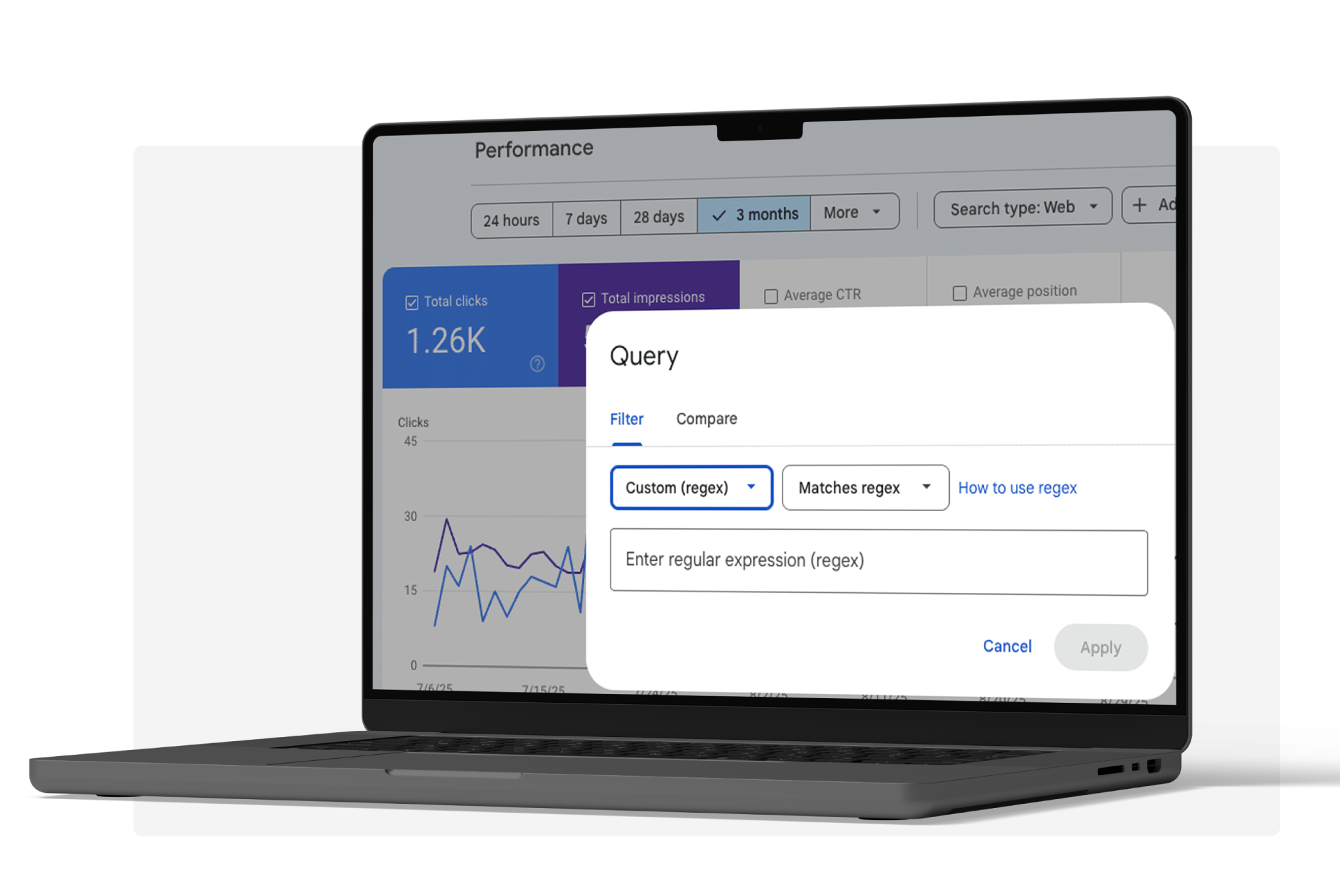
The generative AI performance report is not the only way you can use GSC to analyse your AI visibility. You can also utilise regex filters in the original Search performance report to spot queries that look more conversational, specific or decision-focused.
AI search behaviour often overlaps with more natural language searches. People often ask detailed questions and compare options - often using more than eight words.
Even though regex won’t tell you the exact prompts people are using in AI tools. But it can help you filter Search Console data for queries that behave more like prompts, such as questions, comparisons, "best" searches and longer natural-language queries.
You can use regex to filter for the following, which can inform content updates, FAQs, prompt testing, and GEO reporting.
Below is a list of the main filters you can use on GSC.
Filter question queries
This filter helps to find broad question searches and can help you understand what users are asking before they even reach your website.
Look at:
- Which questions already drive impressions
- Which pages appear for those questions
- Whether the answer is clear on the page
- Whether the query deserves its own section
- Whether the page gives users a useful next step
Question queries are useful for GEO as they often show how people frame a problem, which you can tailor on-site content and marketing collateral to appeal to your customer base. They can also help you build a list of relevant prompts for AI visibility testing.
Filter "how-to" queries
This filter helps to find instructional searches and helps to show you where users need practical guidance, so you can tailor any content to target.
They are useful for:
- Step-by-step guides
- Process breakdowns
- Tutorials
- FAQs
- Explainer content
- Content gaps on existing pages
If a page gets impressions for a "how-to" query but doesn’t fully explain the process, it may need refreshing to answer the question more explicitly. For example, a page that ranks for "How to measure AI visibility" should explain the process clearly for the reader, rather than being a top-level overview.
Filter "what is" queries
This filter helps to find definition queries and helps to show where users need specific definitions or explainers on a topic.
They can help find content opportunities for:
- Glossaries
- Clearer definitions
- Introductory content
- Supporting copy on commercial landing pages
- Internal links
AI systems require clear, consistent information to understand how a given topic, service or brand should be described. If your site gives vague or inconsistent explanation, it makes it harder for both people and AI systems to understand what you do. In turn, AI visibility is reduced.
Filter comparison and decision queries
This filter helps to find comparison searches and can help to show where users are weighing up options.
Look for:
- "Best" queries
- "vs" queries
- "Alternative" queries
- Comparison searches
- Searches that suggest users are close to making a decision
These queries are important because AI answers often appear when users are comparing options or trying to make a decision. If users are comparing providers, tools, products or services, you need to know whether your brand is appearing in these journeys and which third-party sources are cited.
Tip
This is how GSC data can feed into your AiPR® strategy. If you find repeated comparison queries in GSC, test similar prompts across AI platforms.
Does your brand appear? How is it described? Which sources are used? If your brand is missing, you have identified a clear opportunity for your brand to target.
Filter long-tail queries
This filter helps to find queries for five or more words. This can help to understand more specific intent.
They can help you find:
- Detailed customer questions
- Niche use cases
- Missing content on your website
- Which prompts you can test
- Where on-page improvements are needed
- Internal linking opportunities
These queries may have lower search volume, but there is a reason why they are often named ‘low-hanging fruit’, as they can be much more helpful than broader head terms.
For example, "best software" tells you very little about the user’s intent and journey. Whereas "best accounting software for contractors in the UK" gives a clearer view of who the user is, what they are looking for, and the decision context. This is useful for both SEO and GEO planning.
Filter queries of 8 or more words
This filter helps to find queries of eight or more words. Similar to long-tail queries, they help to identify more about your consumers and provide eye-opening details you may not get elsewhere.
They might show:
- How users describe a problem in their own words
- What details are important to them
- Which comparisons they’re making
- What they expect an answer to include
- Where your content might be too broad
It isn’t necessary to create new pages around these queries, but it can be a great way to identify patterns in your customers and their thought processes.
If several queries cover the same issue, this is an indication that your content either isn’t clear enough or is missing entirely. In turn, helps you to tailor content accordingly to ensure these areas are covered.
Regex cheat sheet table
| Use case | Regex |
|---|---|
| All questions | (?i)^(who|what|when|where|why|how|which|does|do|is|are|can|could|should|would|will|did|has|have|was|were) |
| "How to" queries |
(?i)^how\s+(to|do|does|can|should|would|much|many|long|often|far) |
| "What is" queries | (?i)^what\s+(is|are|does|do|was|were|should|can|would) |
| Best/comparison queries |
(?i)(^best\s|\sbest\s|vs\s|versus|compared\s+to|comparison|\svs$) |
| Long-tail queries |
^\S+\s\S+\s\S+\s\S+\s\S+ |
| 8+ word queries |
(\S+\s){7,}\S+ |
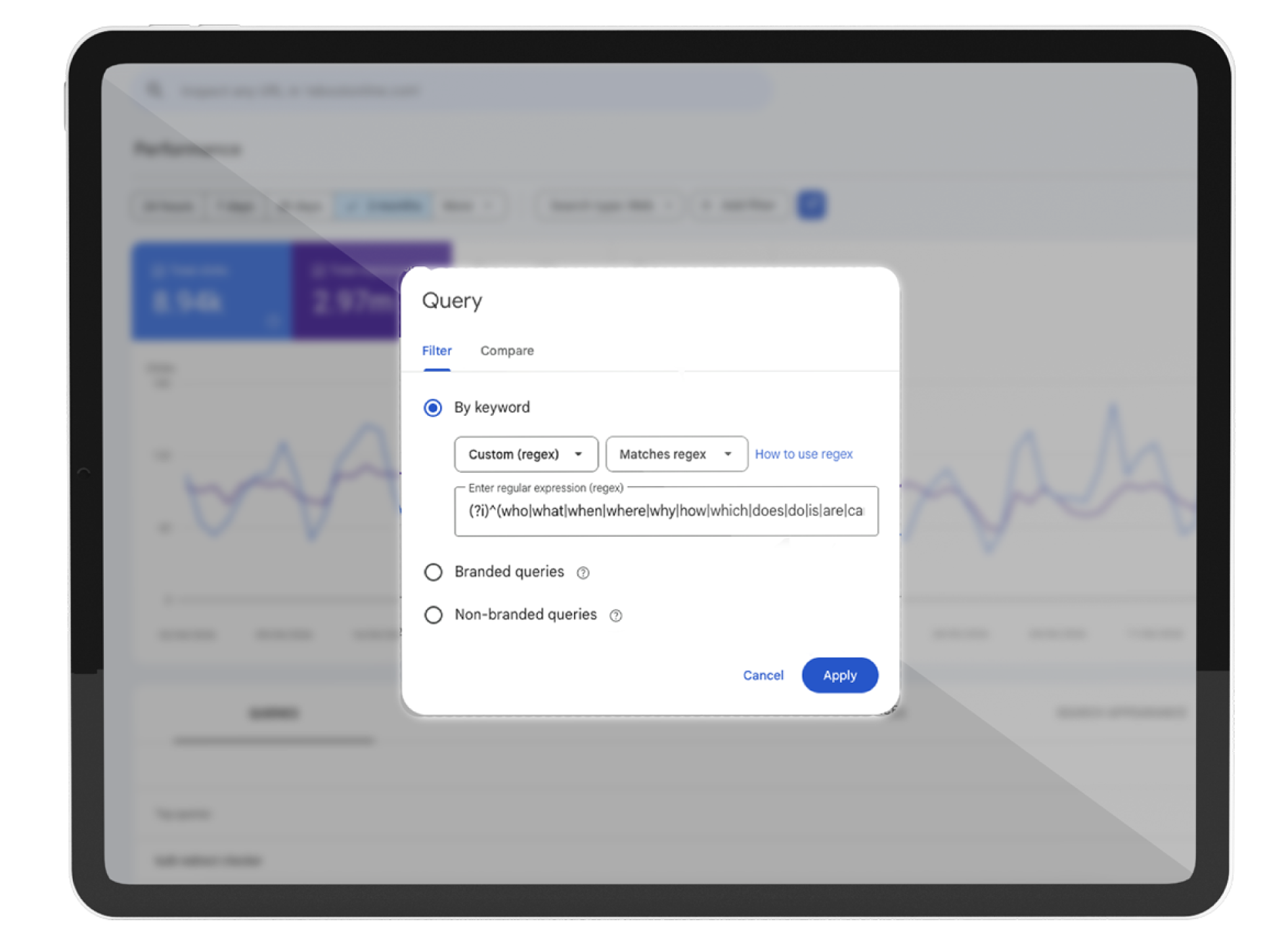
Below is a screenshot of how you use a regex string on GSC, using 'all questions' as an example:
How to turn regex patterns into on-site improvements
Regex findings should feed directly into content updates. You can use query patterns to work out what users need and where existing pages fall short.
| Finding lots of | What it suggests | Action |
|---|---|---|
| "What is" queries | Users need definitions | Add clearer explainers and glossary-style sections |
| "How to" queries | Users need process detail | Add steps, examples and practical guidance |
| Comparison queries | Users are weighing up options | Create or improve decision-stage content |
| Long-tail queries | Users have specific needs | Add supporting sections that answer those needs |
| Question queries | Content may be too broad | Add FAQs or natural-language headings |
How to turn AI visibility data into action
AI visibility reporting should not stop at impressions. To understand whether the data is useful, you need to look at what the visibility means.
At Reboot, we look at AI visibility through something we call the three Rs - reach, relevance and recommendation. Let’s look at what each of these means.
 Recognition: Where are you appearing?
Reach is about where your brand or pages are appearing in AI search.
In GSC, this includes:
- Generative AI impressions
- Visible pages
- Country visibility
- Device visibility
- Changes over time
Begin by looking at whether visibility exists, and whether it is useful for your brand.
Questions to ask:
- Which pages are appearing?
- Are priority pages missing?
- Are only blog posts appearing?
- Is visibility limited to certain markets?
- Are there pages with high impressions but low clicks?
If a page is appearing in Google’s generative AI features, it suggests Google can access the page and surface that URL. The next step is to improve the quality and usefulness of the page in question.
Actions may include:
- Improve internal linking to priority pages
- Refresh outdated pages already getting AI impressions
- Make key answers clearer on the page
- Strengthen headings and summaries
- Check crawlability, indexability and technical health
- Link informational content to commercial pages
 Relevance: Are you visible for the right topics?
Relevance is about whether your visibility is aligned to the right services, products, topics, markets and customer needs. Essentially, are you showing up for what your brand wants to be known for?
This is where regex can be useful, as question, comparison and long-tail queries identify whether your content is being found for the right topics and needs.
Questions to ask:
- Are you appearing for the topics you want to own?
- Are the visible queries commercially useful?
- Are you appearing for early-stage questions only?
- Are decision-stage searches missing?
- Are users asking questions your content does not answer properly?
Actions may include:
- Map queries back to priority services or products.
- Add missing sections to existing pages.
- Build supporting guides around repeated questions.
- Add clearer definitions and summaries.
- Improve headings so they match how people search.
- Strengthen brand-topic associations across the site.
 Recommendation: Is there enough evidence to trust you?
Recommendation is about whether AI systems have enough trusted evidence to include, cite or recommend your brand.
GSC can show whether your pages are appearing in Google’s AI features, but it can’t explain why your brand isn’t being recommended. This is why you need to look beyond your website.
Questions to ask:
- Are competitors being cited more often?
- Are third-party sources shaping the answer?
- Is your brand included in relevant listicles?
- Do external sources describe your brand accurately?
- Is there enough expert commentary around your priority topics?
- Are there credible sources supporting your authority?
Actions may include:
- Earn relevant third-party coverage
- Secure inclusion in high-value listicles and comparison articles
- Publish original data
- Use expert commentary
- Strengthen off-site brand-topic associations
- Make sure external mentions describe the brand accurately
- Use AiPR® to strengthen the off-site evidence around priority topics
If GEO focuses on improving how AI systems understand and retrieve your brand, AiPR® helps strengthen the off-site evidence that supports those associations, from relevant coverage and expert commentary to listicles, citations and original data.
Find out more
What to do with the Google Search Console data?
Once you know which pages and query patterns are showing up, the next step is to turn that data into a simple action plan. Here is an example of a six-step flow you may want to try:
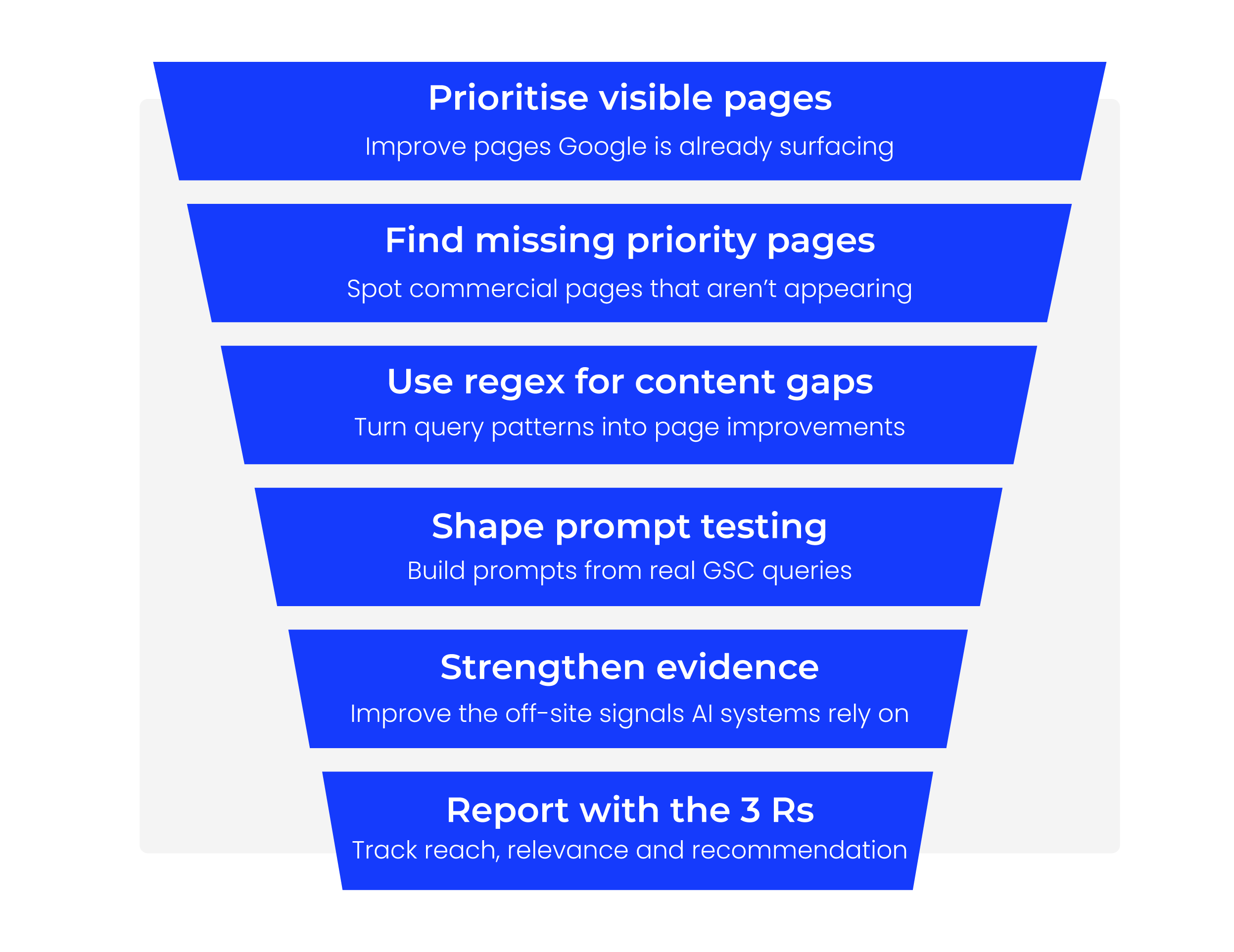
 Prioritise pages already appearing in generative AI answers
Start with pages Google is already surfacing, then improve the copy, structure, internal links and next steps.
Identify high-value pages that are missing
Compare visible pages against your priority commercial pages to spot gaps in reach, relevance or authority.
Turn regex patterns into on-site improvements
Use question-led, comparison-led and long-tail queries to improve headings, FAQs, summaries and supporting sections.
Use GSC data to tailor prompt testing
Turn real search queries into AI prompts, then test whether your brand appears, how it is described and which sources are used.
Strengthen the evidence around priority topics
If competitors are being cited more often, build stronger off-site signals through relevant coverage, listicles, expert commentary and original data.
Create an AI visibility report using the 3 Rs
Track reach, relevance and recommendation together, so AI visibility is reported as more than impressions alone.
What this means for brands
Google Search Console can now give brands a clearer starting point for understanding AI visibility in Google search. But the data only becomes useful if you know what to look for.
Use the data to decide where attention is needed first. That might mean improving pages Google is already surfacing, finding out why priority pages are missing, or using repeated questions and comparison queries to shape content updates, prompt testing and wider GEO reporting.
The aim is not just to track AI impressions. It is to understand whether your brand is appearing in the right places, for the right topics, with enough trusted evidence to be included, cited or recommended.
If you're looking for help with your AI visibility strategy, our award-winning GEO agency can help.
Get in touch